 |
Frothers Unite! UKCampaign Pages |
Tribals versus Vermen- guidelines for developing a wargame campaign using BerthierIntroductionA long time ago on a computer not so far from here we received an email from Colonel Marbles telling us about this piece of DOS software which could be used for campaign wargaming. After a bit of collective sniggering and slagging (it was DOS after all) some of us did listen to him. We sat down and had a look at the software and were actually pleasantly surprised by the possibilities it presented! This page is the outcome of that. What follows is a description of a campaign battle played using the freeware program Berthier, which is currently underway between frotherbAz and Doc. Frustrated by a lack of tabletop miniatures battles, we wanted a battle game we could play with relatively little bother over email. Additionally we will aim to provide an account of how the campaign progresses. With Berthier we saw the potential to play a simple strategic game which would also lend a context to later tabletop battles (should we get the opportunity) for any important encounters.
Being new to Berthier and wanting to kick it off rather than spend a great deal of time balancing all of the wargame elements, we decided to emphasize the narrative elements of the campaign. An advantage of any computer-based wargame is the ability to easily simulate a fog of war (a hugely difficult task in a tabletop battle, even with a referee), so we wrote this into our game from the beginning. We tied the background in with that of our Fantasy Warriors armies, the Ver'men and Tribals, and a scenario that should lead to small but significant encounters, a Ver'men raiding army. Using Berthier - producing a map and a map gridBerthier is a freeware game by Tony de Lyall, and is available to download from his website at http://members.tripod.com/delyall/berthier/berthier.html. While written with napoleonics or ECW in mind, it is flexible and straightforward enough to allow anyone to create a campaign for pretty much any setting, just by tweaking around with the various parameters it provides. For the benefit of anyone looking to use Berthier we will be sharing the details of how we have used it in our campaign. Its use does take a little forethought and planning in particular in the early stages of setup. The first thing to do is produce a campaign map. These can be of any scale and style, with up to 99x99 for a massive game, so you can decide how big and how detailed you want your map to be. Berthier allows each square to be made up of one defined terrain type, although you can use the program to overlay your map grid over a bitmap image to produce a better looking campaign map for your players and then produced the terrain map by referring to this. The Campaign map
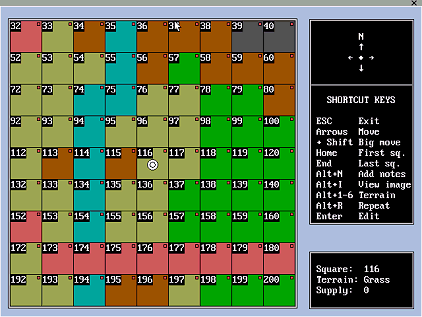
The map grid Berthier produces uses a grid structure with squares numbered consecutively in rows from the top left, which you can then easily lay over your original map using the Berthier software. Figure 1: Typical grid numbering in Berthier
Remember the size of the grid will determine the scale of the map as well as the rate at which the forces can move around the map. Two grids might cover the same size area (but a grid with more squares will allow a greater degree of detail for the terrain and make it easier for individual units to pass each other without encounter (which may not be desirable for your scenario).
Our map was overlayed with a 50 column by 40 row grid- a fairly large map, but we are looking for an infiltration campaign over a large area. Campaign map with gridUnit types - deciding on basic movement ratesNow Berthier allows space for eight unit types meaning that you need to decide at a very early stage what these unit types will represent. We decided that each unit type would represent an army or units with the following composition: Table 1: Unit types
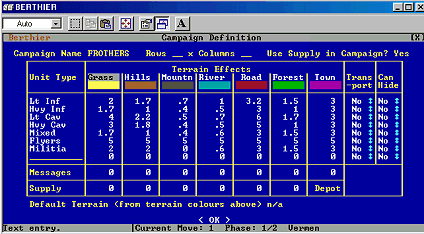
Now you could of course change these to suit the sorts of units you are likely to field. It so happens that none of us have heavy or extra heavy cavalry and so we tailored the unit types in Berthier to the sorts of army compositions we would like to field. In addition to normal units and the issue of whether or not they are supplied you can specify if a unit can hide or not. This could prove very useful for simulating special reconnaissance type units. In this campaign these were our flyers. Terrain effectsHaving decided on the unit types the next thing to do is enter these unit types along with the likely movement effects each type of terrain would have on each of these type of unit. These are of course entered into a Terrain effects table (Figure 2 below). Figure 2: The Campaign definition table in Berthier
Deciding this bit also means you have to decide how long a turn is going to take. Since the grid we had was quite a big arena we will say that each turn occurs over a period of about five days. This allows us more movement per turn and ensures we can move around the map fairly sensibly. As a result the average movement for a light infantry unit will be 8 miles x 7 = 40 miles which is 2 squares over rough terrain per turn. Berthier allows you to do fractional movement so we could say that on the roads a light infantry unit can move 10 miles a day or 70 miles a week which is 3.5 squares per turn. These distances are summarised in Table 2. Special rules for flyersBerthier does not have special rules for flying creatures therefore it is necessary to set special rules for these in the game. It has to fall as a gentleman's agreement that any flyer unit which can see any other unit can be seen by that unit. It is a matter of trust and may not suit some types of games. In addition The 'Doc' had the great idea of restricting their mobility by tying them to the main forces, they will therefore have an attrition rate and the main armies will be given a wagon train value. Flyer units will therefore need to return to the main army to be resupplied. This means that they will be able to go out for a few turns before needing to return. After making all of these decisions it is time to edit the map grid so it looks like the map you have produced elsewhere. Figure 3 below is an image of the terrain editor screen. Click here for an overview of the grid we produced for this campaign. Figure 3: Terrain editing in Berthier
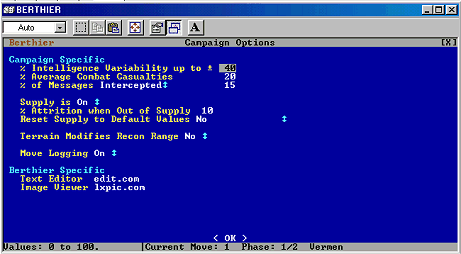
Campaign optionsBerthier allows you to modify various variables to help in the campaign simulation (see Figure 4). Figure 4: Campaign options
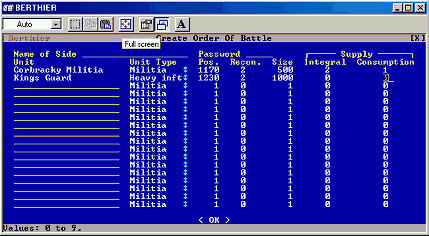
These are as follows: Intelligence VariabilityBerthier allows you to set the intelligence variability for the campaign, this can be from 0% to 100%. The variability means that whenever you make contact with the enemy you will receive an estimate of the size of the enemy which can vary by up to a percentage for this variable. So lets say we set it at 50% and there is contact in the campaign. The size of the enemy in your intelligence report will vary by up to 50% of the actual force. So you may end up attacking an enemy who is up to 50% bigger than you originally thought. Average Combat CasualtiesBerthier also allows you to set the average combat casualties for the campaign the default is 15% but this can be varied according to the average numbers associated with either the period you are playing or the sort of campaign you wish to play. This value represents the casualties you will receive if you have equal forces. Percentage messages interceptedThere is a function in Berthier to allow messages to be intercepted between units. The intercepted messages are kept in a log.txt file. This would be a useful function if you were playing a game with other people in charge of other units. Otherwise it doesn't seem to have much functionality for the purposes of this campaign. SupplyYou can turn the supply function on or off at any time. You set the attrition rate to a unit when it goes out of supply (as a percentage per turn), and there is also a toggle to reset all terrain values to the same whenever you wish to simulate the start of a new campaign season. Because of the large timescale and the way we are using supplies in the campaign, we have used a fairly high value of attrition (10%). Terrain Modifies Recon rangeWith this option the reconnaissance range of a unit is modified by the movement rates set in the terrain table at the start of the campaign, meaning that a unit will have a good picture of what is down the road, but not what is over the river or in the woods. We decided this would be a good option for a stealth campaign, to encourage realistic use of terrain by ambushers. Move LoggingThis is fairly straight forward Berthier can provide a campaign history by logging all movements. This would be useful for reconstructing the narrative of the campaign. Orders of battleAfter setting up the campaign options Berthier asks you to create the orders of battle (See Figure 5 below). The sides get names and passwords, then the units are defined. Each of these are given names and a unit type (from the list created during the Campaign Definition, above), and have their size and their starting position decided.
Figure 5 Orders of battle in Berthier
You need to make sure your units are not deployed in a place where they cannot move, as the program does not guard against this! In fairness it does warn you in the instructions, and it would of course serve you right to have a unit of artillery stuck in a river for an entire campaign. For our purposes no terrain squares were impassable for any unit though. After deployment the units you have to determine their recon range. This is the best thing about the game which enables you to set or simulate cavalry screens around a unit. It also allows you to provide some variability to the unit types. You can see what we decided on in Table 2. This is also where you determine the supply situation for each unit, either using a universal formula or agreeing a supply status and rate of consumption for each unit in turn. It is at this point that you have to set the unit size. As we said previously this is a bigger scale campaign and we are creating units in army points not numbers of troops. This suits our purposes perfectly. SupplyThe next thing you have to do at this point are to set the supply values for each unit, assuming that this option was selected when you defined the campaign. Supply in Berthier begins with integral supply i.e. the amount of supply each unit carries. The integral supply values can be reset either manually or though the attrition function it cannot be made bigger than it is however at this point in time. Unless you delete the unit from the campaign and then re-create it. If you have cadres which are built up during the campaign then you have to make sure their integral supply is big enough to support the unit. Units moving into depots have their integral supply topped up to its maximum value. Units which travel on transport have their integral supply topped up accordingly provided that the transporting unit has enough supply. The supply is removed from the transporting unit accordingly. You have to set the consumption rate for the unit, this is the amount the unit consumes every campaign move. When a unit become unsupplied it suffers attrition losses. The consumption rate is varied throughout the campaign according to the unit size. In addition consumption is taken hierarchically from the transport’s integral supply if the unit is being transported, from their own integral supply, from the square they are living in – i.e. they start to live of the land. After deployment the units you have to determine their recon range. This is the best thing about the game which enables you to set or simulate cavalry screens around a unit. It also allows you to provide some variability to the unit types. You can see what we decided on in Table 2. Table 2: Movement for various types of unit by terrain type
And thats basically it. We will let you guys know how the campaign goes and will of course provide you with updates when the time is right. We hope you found this page interesting and useful!! AND of course 'Snigger not ye at DOS!' | ||||||||||||||||||||||||||||||||||||||||||||||||||||||||||||||||||||||||||||||||||||||||||||||||||||||||||||||||||||||||||||||||||||||||||||||||||||||||||||||||||||||||||||||||||||||||||||||||||||||||